Showing posts with label HTC. Show all posts

Saturday, January 11, 2014

How to root, S-OFF and upgrade HTC Sensation XL

I just had my hands on an HTC Sensation XL and boy it is really hard to root. After a lot of hard work, I finally brought it down to a few simple steps. Here's a tutorial for those needing to root the device. Briefly, it consists of these steps:

1. Unlock bootloader from htcdev.com
2. Install recovery
3. Root
4. S-OFF

1. How to unlock HTC Sensation XL bootloader:
This is the simplest step. It is very easily guided by the HTC's official development website, htcdev.com. Simply go to the website and it will guide you through the entire process. If you have any trouble, ask me.

2. Install recovery:
Once you have unlocked the bootloader, it's time to install the recovery. Download the latest touch recovery from clockworkmod.com/rommanager for "Runnymede". Once downloaded, flash it using the fastboot tools. For example, if the recovery is named runnymede.img, the file has to be placed in the tools folder, the phone should be in fastboot mode and your command should be:
  • fastboot flash recovery runnymede.img
This will install the recovery

3. How to root HTC Sensation XL
To root the device, download this file, extract it and run runme.

4. How to S-OFF HTC Sensation XL
To enable S-OFF, you need to download this file and place the hboot file in the adb tools folder. Then, use the following commands to enable S-OFF:

  • adb push hboot_7230ddr2_Runnymede_6.28.6666.nb0 /data/local/tmp/hboot_7230ddr2_Runnymede_6.28.6666.nb0
  • adb shell
  • dd if=/data/local/tmp/hboot_7230ddr2_Runnymede_6.28.6666.nb0 of=/dev/block/mmcblk0p18
  • exit
  • adb reboot bootloader
Once this is done, install any compatible ICS RUU from androidruu.com to get hboot 1.28. This hboot is compatible for most custom ROMs.

Congratulations, you're all set to install any custom ROM on your HTC Sensation XL with S-OFF!

Sunday, November 17, 2013

How to install a ROM on S-ON HTC devices

Recently, I posted a post about installing a ROM on all android devices except HTC S-ON devices. Every HTC device is S-ON by default but there are some exploits for certain phones that enable you to make them S-OFF (Security-off). This security actually prevents a kernel from being flashed through the recovery. For this reason, there is one added step while installing a ROM on S-ON devices. This tutorial is mostly similar to the previous one.

Before we get started, here are a few things you need to know.

1. Installing a new ROM requires a factory reset of your device. This deletes everything except user data files. Things you lose include user apps, contacts, messages, call log and saved WiFi passwords. On the other hand Gallery, Music, Downloaded items and files you can see in your file manager are not lost.
2. If you are installing an upgrade of your previously installed ROM, data wipe is not mandatory, unless the developer says so. Nevertheless, a data wipe is always recommended.
3. To backup data, you can use different apps. The simplest one you can use is Super Backup. For advanced users, I'd recommend Titanium Backup. This data can be restored after installing the app once the ROM has installed.
4. AOSP ROMs (Cyanogenmod, Android Open Kang Project and Paranoid Android) mostly do not have Google Apps included due to copyright issues. Google Apps or gapps are therefore separately downloaded and installed as a zip. You can downloaded the latest gapps for you ROM from here.

Here is what you need:

1. A custom ROM zip (and gapps, if required).
2. A rooted device with a custom recovery installed.
3. Android SDK (just adb and fastboot tools needed)

Here is how you install a new ROM:

1. Extract the ROM to yield the boot.img file from the zip. Transfer the ROM zip to your internal memory.
2. Put the boot.img file in the sdk tools folder.
3. Open command prompt and navigate to the sdk tools folder.
4. Connect your device with USB debugging on in developer tools.
5. Reboot the device into fastboot from the sdk with the command "adb reboot fastboot"
6. Once the phone has rebooted into fastboot, showing fastboot menu, flash the kernel with command "fastboot flash boot boot.img"
7. Once it has been flashed, reboot into recovery.
8. Once in recovery, select factory reset and confirm. Then wipe cache. Then go to advanced and wipe dalvik cache. This completes the wiping process.
9. Go back and select install zip. Select and install the custom ROM zip.
9a. Install the gapps zip, if applicable.
10. Reboot your device.

Congratulations, your new ROM is ready to use!

Applicable to (but not limited to):
1. HTC One X
2. HTC One
3. HTC One S
4. HTC Sensation (if S-ON).

Saturday, September 7, 2013

How to install a new ROM (for all except S-ON HTC devices)

People always ask me how to install a new Android ROM onto their devices. This is very simple and I'll try my best to make it simpler. This tutorial assumes that your devices is rooted and you have a custom recovery (like Clockworkmod, TWRP or 4ext recovery) installed.

Before we get started, here are a few things you need to know.

1. Installing a new ROM requires a factory reset of your device. This deletes everything except user data files. Things you lose include user apps, contacts, messages, call log and saved WiFi passwords. On the other hand Gallery, Music, Downloaded items and files you can see in your file manager are not lost.
2. If you are installing an upgrade of your previously installed ROM, data wipe is not mandatory, unless the developer says so. Nevertheless, a data wipe is always recommended.
3. To backup data, you can use different apps. The simplest one you can use is Super Backup. For advanced users, I'd recommend Titanium Backup. This data can be restored after installing the app once the ROM has installed.
4. AOSP ROMs (Cyanogenmod, Android Open Kang Project and Paranoid Android) mostly do not have Google Apps included due to copyright issues. Google Apps or gapps are therefore separately downloaded and installed as a zip. You can downloaded the latest gapps for you ROM from here.

Here is what you need:

1. A custom ROM zip (and gapps, if required).
2. A rooted device with a custom recovery installed. This includes all devices except S-ON HTC devices. S-OFF HTC devices can use this method. For S-ON devices or to check which one are you, click here.

Here is how you install a new ROM:

1. Transfer the ROM to your internal memory. Internal memory is preferred because it is safer than an SD card because of a risk of corruption.
2. Boot your phone into recovery. Every device has its own way to boot into recovery which you can easily find out by googling it. If you can't find it, ask me.
3. Once in recovery, select factory reset and confirm. Then wipe cache. Then go to advanced and wipe dalvik cache. This completes the wiping process.
4. Go back and select install zip. Select and install the custom ROM zip.
4a. Install the gapps zip, if applicable.
5. Reboot your device.

Congratulations, your new ROM is ready to use!

Applicable to (but not limited to):
1. All Samsung Galaxy S devices.
2. All Samsung Galaxy Note devices.
3. Virtually all Samsung Galaxy devices.
4. HTC Sensation (if S-OFF).
5. All Nexus devices.

Saturday, November 3, 2012

After Google, Microsoft and Apple, we have Facebook

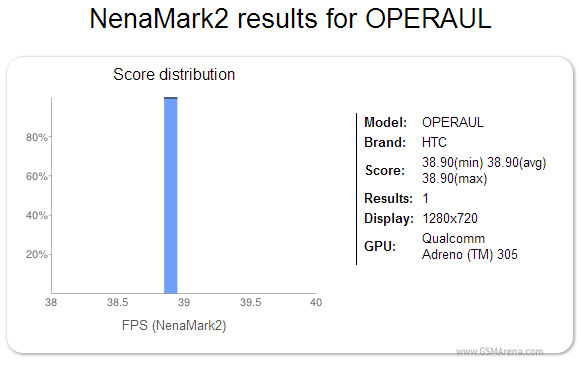
Facebook might be working on a Facebook phone after all, despite repeatedly denying any such plans. A reliable source told Pocket-lint that HTC is working on a device codenamed Opera UL.

The phone in question has appeared in the NenaMark2 results database and what we learn is the phone is powered by a 1.4GHz (probably dual-core) Krait processor with Adreno 305 graphics and sports an HD display. It's currently running on Android 4.1.1 Jelly Bean.
It seems Pocket-lint have no reason to doubt their source and we should probably be listening for a word from HTC and Facebook in the indefinite but not so distant future.

Source

Dawn of True HD 1080p Smartphones


The first 1080p smartphones are a reality and regardless whether you consider 400+ ppi pixel density as great or as an overkill, the next generation of Android flagships will most probably feature FullHD screens.


MK News is reporting that Samsung is already working on a Full HD display, which will use the company's trademark Super AMOLED technology while LG is using  Advanced High Performance In-Plane Switching or AH-IPS LCD.


This is the same technology that LG used in one of its panels last year for which they also won an award. Compared to standard IPS panels, AH-IPS panels have greater color accuracy, wider viewing angles and greater light transmission which leads to lower power consumption.
It's not clear how big the display will be either, though it should have a pixel density of at least 400 ppi  meaning 5" or bigger. 
 
Speaking of phones with 5-inch Full HD screens, the HTC J Butterfly is already official.

It packs  5.0-inch, Super LCD 3 with a resolution of 1920 x 1080, which gives it a pixel density of the astonishing 440 ppi. The display is quite big but at 143 x 71 x 9.1 mm, the J butterfly is only slightly bigger than the One X (134.4 x 69.9 x 8.9 mm) and at 140g weighs just 10g more.

Inside, the HTC J butterfly runs on a quad-core Qualcomm APQ8064 Snapdragon S4 processor clocked at 1.5GHz with 2GB of RAM. It has 16GB internal memory along with a microSD card slot.


On the back is an 8 megapixel camera with 1080p video recording and on the front is a 2 megapixel camera. The phone supports LTE and NFC and is dust and waterproof (IPX5). Strangely, for a phone with such specs, the battery is only 2,020mAh. Lastly, the J butterfly will ship with Android 4.1 Jelly Bean out of the box.


The Oppo Find 5 has a 5-inch screen of Full HD resolution with a narrow 3mm bezel. It runs on 1.5Ghz Qualcomm APQ8064 quad-core chipset with 2GB RAM. The aluminum unibody has a thickness of merely 6.9mm and the 12MP camera with a Sony backlit sensor allegedly doesn't bulge at all.
But that's not all, as there is also a nice and hefty 2500mAh battery inside to power the thing. Oh, and there's Android 4.1 Jelly Bean preinstalled.


Close window

The Xperia C650X Odin is rumored to feature a 5" screen with the impressive 1080p resolution, resulting in an mind-blowing density of 440 ppi, a quad-core Snapdragon S4 Pro processor with four 1.5 GHz Krait cores, a 13 MP snapper on the back, 2GB of RAM and 32 gigs of internal storage.

All these beasts are set to launch sometime next year , but one thing thing is for sure that they'll give the smartphones of today a run for their money.

Stay tuned guys!


Source 1 ,Source 2, Source 3.